

VDI is the native format for VirtualBox and has many advantages over VMDK disk. VMDK also has its own advantages over other formats and you can also use vmdk disk with VirtualBox. In some cases, if you still required to convert .vmdk to .vdi disk format. Use VBoxManager command to convert .vmdk to .vdi.
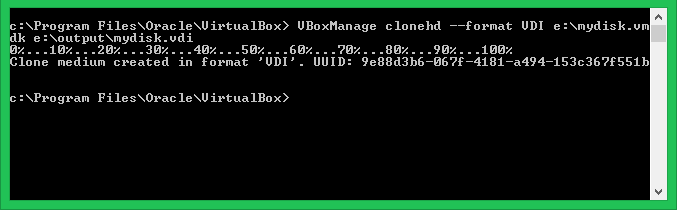
VBoxManage – Convert VMDK to VDI
If the vmdk disk is attached to running virtual machine shutdown the VM first and remove vmdk file from VM.
Windows Users can use the following command to change UUID of D:\NewVM\myDisk1.vdi disk.
c:\> cd "C:\Program Files\Oracle\VirtualBox\"c:\> VBoxManage clonehd --format VDI mydisk.vmdk mydisk.vdi
Linux Users can also use the VBoxManage command to change UUID of a disk.
VBoxManage clonehd --format VDI mydisk.vmdk mydisk.vdi
How did it make you feel?

Using VBox 6.1 and UB 20.04, VBox changed clonehd to clonemedium, same syntax.
yes, it works. tested virtualbox 5.2 ubuntu 20.04
Does not work if you do not keep the image files in the same directory. Attempt to put in the directory string and get Syntax error: Invalid parameter ’10’, but thanks!