

Certbot is a free tool that helps manage Let’s Encrypt certificates. With Certbot, you can create certificates with one simple command and set up web servers easily.
By default, Certbot saves all certificates in the directories listed below. We don’t recommend deleting files manually. In this guide, we will show you how to delete old SSL certificates using Certbot’s command line.
- /etc/letsencrypt/live
- /etc/letsencrypt/renewal
- /etc/letsencrypt/archive
How to Delete a Let’s Encrypt SSL Certificate
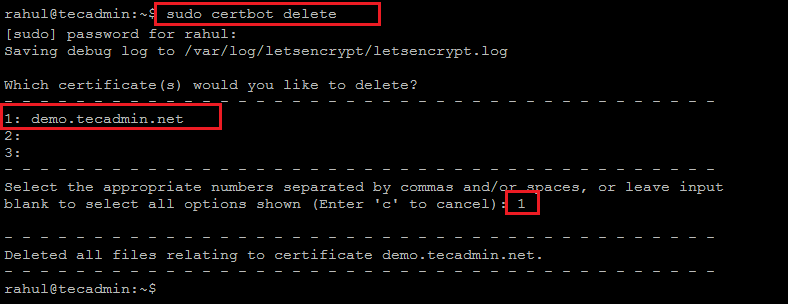
Certbot lets you delete certificates automatically. To remove a certificate, use this command:
sudo certbot delete
This command will show a list of domain names. Choose the number of the domain you want to delete and press enter. The certificate and related files will be removed.
If the domain name you want to delete is not listed, you can use this command:
sudo certbot delete --cert-name example.com
That’s all!
Conclusion
This guide explained how to delete a Let’s Encrypt SSL certificate using the Certbot command-line tool. Certbot makes it easy to manage SSL certificates with simple commands, allowing users to delete unneeded certificates quickly and safely.
How did it make you feel?



Hump! I want to use a script that runs autonamously to delete old certificate files and leave the current/latest. Not via an interactive (user required) interface
I followed these steps and the cert files were deleted but the backups were still there.
I followed these steps and the cert files were deleted but the crontab and backups were still there.
That needs to be deleted manually.