What is Deadlock in Operating Systems?
A clear, beginner-friendly guide to understanding deadlock, its causes, and solutions
In an operating system, many programs (called processes) run at the same time. Sometimes, these processes need the same resources like memory, files, or printers. When two or more processes keep waiting for each other and never move forward, this situation is called deadlock.
Definition
Deadlock is a situation in an operating system where a group of processes are permanently blocked, each waiting for a resource held by another process in the group. Because none can proceed, the system comes to a standstill.
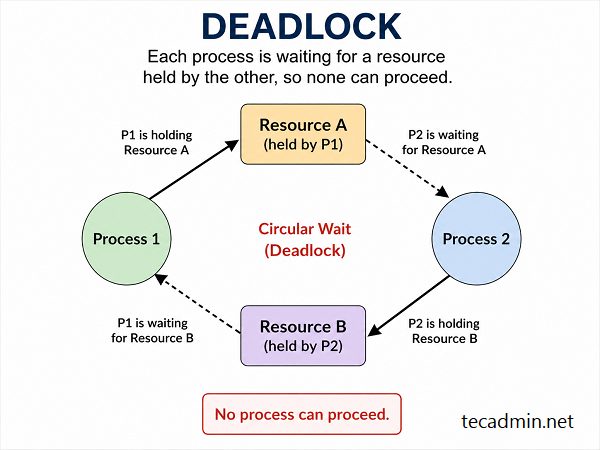
1. What is Deadlock?
Deadlock happens when a group of processes are waiting for resources that are being held by each other. Because of this, none of the processes can proceed. A classic analogy makes this easy to visualize:
Both are waiting for each other, so neither can continue — this is exactly what happens in a deadlock.
2. Real-Life Example of Deadlock
Think about a traffic situation at a four-way intersection:
- Each car is waiting for another car to move
- No car can move because all are blocked
- The entire intersection is frozen — no progress is made
This is a perfect real-world deadlock situation.

3. Four Conditions for Deadlock
Deadlock occurs only when all four of the following conditions hold simultaneously. Remove any one of them and deadlock cannot occur.
Key insight: All four conditions must be present at the same time for deadlock to occur. Eliminating even one condition is enough to prevent it.
4. Types of Deadlock
5. How to Prevent Deadlock
Deadlock prevention works by ensuring that at least one of the four necessary conditions can never hold.
Prevention Strategies — Break One Condition:
Break Mutual Exclusion:
Break Hold and Wait:
Allow Preemption:
Prevent Circular Wait:
6. Deadlock Avoidance
Instead of outright preventing conditions, the system can dynamically check whether granting a resource request will lead to a safe state before actually granting it.
Key Algorithm
The Banker’s Algorithm is the classic deadlock avoidance technique. Before granting any resource, the system simulates the allocation and checks whether a safe sequence of execution still exists for all processes. If no safe sequence exists, the request is delayed.
7. Deadlock Detection and Recovery
When prevention and avoidance are not used, the system must be able to detect and recover from deadlock after it occurs.
- Maintain a resource allocation graph
- Periodically run a cycle-detection algorithm
- A cycle in the graph indicates a deadlock
- Terminate processes — abort one or more deadlocked processes
- Resource preemption — forcibly take resources from some processes and give them to others
8. Why is Deadlock Important?
Ignoring deadlock can have serious consequences for any software system:
9. Key Points to Remember
- Deadlock is a state where processes are permanently stuck waiting for each other.
- It requires all four conditions — mutual exclusion, hold and wait, no preemption, and circular wait — to occur simultaneously.
- Prevention eliminates at least one necessary condition by design.
- Avoidance uses algorithms like the Banker’s Algorithm to ensure a safe state before granting resources.
- Detection and Recovery allow deadlock to occur but identify and resolve it afterwards.
- The two types of deadlock are Resource Deadlock and Communication Deadlock.
- Understanding deadlock is essential for building reliable, high-performance operating systems and concurrent applications.
In short: Deadlock = Processes waiting forever = No progress. By understanding its causes, conditions, and the strategies for prevention, avoidance, detection, and recovery, you can design systems that stay responsive and avoid costly failures.
How did it make you feel?