

Laptops, phones, tablets, smart TVs, ATMs, even washing machines and cars: computers are everywhere. But what exactly makes something a computer? In this guide you’ll learn what a computer is, how it works, its main parts, the different types of computers, what they’re good (and not so good) at, and how they’ve changed from room-sized machines to the phone in your pocket.
What is a Computer?
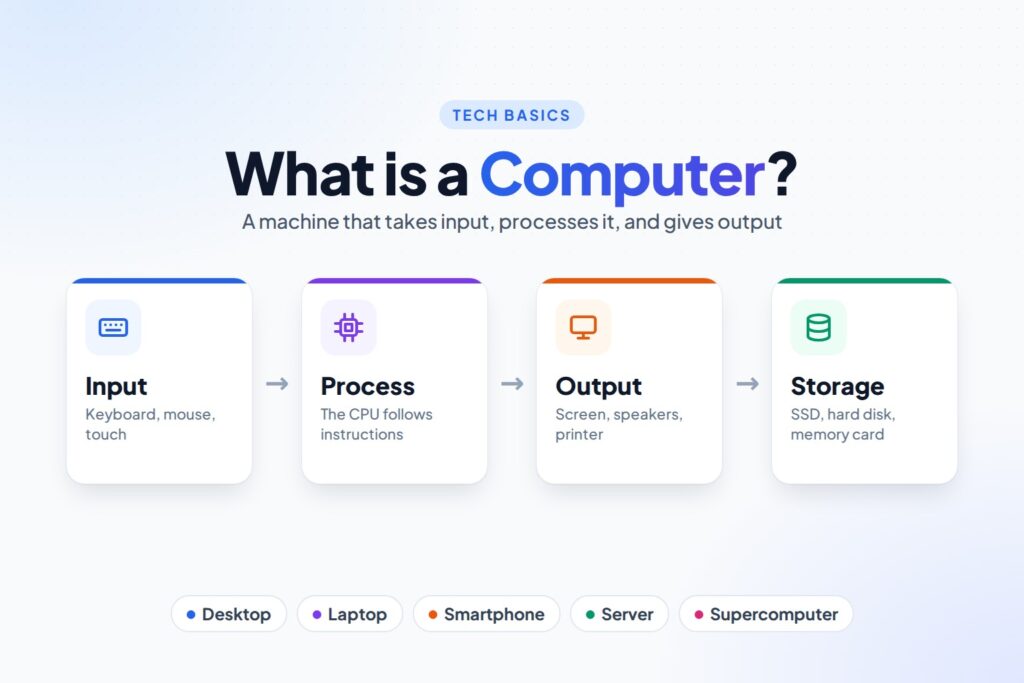
A computer is an electronic machine that takes in data, processes it by following a set of instructions, stores it, and gives out useful results.
The word comes from compute, which means “to calculate”. In fact, about 400 years ago a “computer” was a person whose job was to do long calculations by hand. Today the word means the machine, and it does far more than calculate: it plays music, shows videos, sends messages, draws pictures, controls robots and much more.
What makes a computer special is that it’s programmable. A calculator can only do sums. A computer can do almost any job, as long as someone gives it the right instructions, called software.
How Does a Computer Work?
Every computer, from a phone to a supercomputer, follows the same four steps. This is called the IPOS cycle: Input, Process, Output and Storage.
- Input: you give the computer data or a command, for example by typing, clicking, touching the screen or speaking.
- Process: the CPU (Central Processing Unit) follows the software’s instructions to work on that data.
- Output: the computer shows you the result on a screen, through speakers or on paper from a printer.
- Storage: the computer saves data and results so they can be used again later.
Example: Adding two numbers on a calculator app
| Step | What happens |
|---|---|
| Input | You tap 25 + 17 on the touch screen |
| Process | The CPU adds the numbers |
| Output | The screen shows 42 |
| Storage | The app keeps the answer in its history |
Every task a computer does, from a sum to a video call, follows this same Input → Process → Output → Storage pattern.
Main Parts of a Computer
A computer is made of hardware, the parts you can touch, and software, the instructions that tell the hardware what to do. The main hardware parts are:
| Part | What it does | Examples |
|---|---|---|
| Input devices | Send data and commands into the computer | Keyboard, mouse, touch screen, microphone, camera |
| CPU (processor) | The “brain”: follows instructions and does calculations | Intel Core, AMD Ryzen, Apple M-series chips |
| Memory (RAM) | Short-term memory for whatever the computer is working on right now; it’s emptied when the power goes off | 8 GB, 16 GB RAM |
| Storage | Long-term memory that keeps files even when the computer is off | SSD, hard disk, USB drive, memory card |
| Output devices | Show or give out the results | Monitor, printer, speakers, headphones |
| Motherboard | The main circuit board that connects all the parts together | Inside every computer case and phone |
Learn more in What is an Input Device? and What is a CPU?
Types of Computers
Computers come in many sizes, from giant machines that fill a building to tiny chips inside a toy.
| Type | What it is | Used for |
|---|---|---|
| Supercomputer | The fastest and most powerful computers in the world, often filling a whole room | Weather forecasting, space research, medicine, AI |
| Mainframe | Very large, reliable computers that handle millions of transactions | Banks, railways and airline booking, government |
| Server | A computer that provides services to other computers over a network | Websites, email, apps, cloud storage |
| Desktop | A personal computer that stays on a desk, with a separate monitor and keyboard | Offices, schools, gaming |
| Laptop | A portable computer with a built-in screen, keyboard and battery | Work, study, travel |
| Tablet and smartphone | Small, touch-screen computers you carry everywhere | Calls, apps, photos, browsing |
| Embedded computer | A tiny computer built inside another machine to control it | Washing machines, cars, microwaves, smart watches, ATMs |
The fastest supercomputers today can do more than a billion billion (1018) calculations every second. Doing that many sums by hand, one per second, would keep every person on Earth busy for almost four years without a break!
Analog, Digital and Hybrid Computers
Computers can also be grouped by the kind of data they work with:
- Digital computers work with numbers (0s and 1s). Almost every computer today is digital.
- Analog computers work with things that change smoothly, like temperature, speed or pressure. Old speedometers and thermometers worked this way.
- Hybrid computers combine both, for example machines in hospitals that measure a patient’s heartbeat (analog) and show it as numbers (digital).
What Are Computers Good At?
- Speed: they do billions of steps every second.
- Accuracy: with correct instructions and data, they don’t make calculation mistakes.
- Storage: a small memory card can hold thousands of books, photos and songs.
- Diligence: they never get tired or bored, and do the millionth task as carefully as the first.
- Versatility: the same computer can be used for writing, games, music, video calls and much more.
What Can’t Computers Do?
- They can’t think for themselves. A computer only does what its software tells it to do. Even AI only learns patterns from data.
- They have no feelings or common sense.
- They depend on power and stop working without electricity or a charged battery.
- Wrong input gives wrong output. This is called GIGO: “Garbage In, Garbage Out”. If you type a wrong number, the computer will happily give you a wrong answer.
A Short History of Computers
- Thousands of years ago: people counted with the abacus, beads on rods.
- 1830s: Charles Babbage designed the Analytical Engine, a mechanical computer. He’s often called the “father of the computer”. Ada Lovelace wrote what is seen as the first computer program for it.
- 1940s: the first electronic computers were built. ENIAC (1945) weighed about 27 tonnes and filled a large room.
- 1950s–1960s: transistors and then integrated circuits (chips) made computers smaller, faster and cheaper.
- 1971: the first microprocessor, a whole CPU on one tiny chip, was released.
- 1980s: personal computers (PCs) arrived in homes and offices.
- 2000s–today: laptops, smartphones and tablets put powerful computers in everyone’s pocket, and AI is changing what they can do.
School books often group this history into five generations:
| Generation | Approx. years | Main technology |
|---|---|---|
| First | 1940–1956 | Vacuum tubes |
| Second | 1956–1963 | Transistors |
| Third | 1964–1971 | Integrated circuits (ICs) |
| Fourth | 1971–today | Microprocessors |
| Fifth | Today and the future | Artificial intelligence |
Practice Questions
Try these yourself, then click a question to see the answer.
1. What are the four steps a computer follows?
Input, Process, Output and Storage (the IPOS cycle).
2. Which part is called the brain of the computer?
The CPU (Central Processing Unit).
3. Is a printer an input or an output device?
Output. It gives out results on paper.
4. Which keeps your files when the power is off: RAM or storage?
Storage, such as an SSD or hard disk. RAM is emptied when the power goes off.
5. What kind of computer is inside a washing machine?
An embedded computer.
6. What does GIGO stand for?
Garbage In, Garbage Out: wrong input gives wrong output.
FAQ
What is a computer in simple words?
A computer is an electronic machine that takes in data, works on it by following instructions, and gives out results. Laptops, desktops, tablets and smartphones are all computers.
Who is the father of the computer?
Charles Babbage, an English mathematician who designed the Analytical Engine in the 1830s, is usually called the father of the computer.
What is the full form of COMPUTER?
COMPUTER is not really an abbreviation. It comes from the word “compute” (to calculate). Expansions you may see online, such as “Commonly Operated Machine…”, are made-up memory tricks, not an official full form.
Is a mobile phone a computer?
Yes. A smartphone has a CPU, memory, storage, input (touch screen, microphone, camera) and output (screen, speaker), and it runs software, so it’s a small computer.
What are the main types of computers?
By size: supercomputers, mainframes, servers, desktops, laptops, tablets and smartphones, and embedded computers. By the data they use: digital, analog and hybrid computers.
What is the difference between hardware and software?
Hardware is the physical parts you can touch, like the keyboard and CPU. Software is the instructions that tell the hardware what to do, like Windows or a game.
Conclusion
A computer is an electronic machine that takes input, processes it with the CPU, gives output and stores data, following instructions from software. Its main parts are input devices, the CPU, memory, storage, output devices and the motherboard. Computers come in every size, from supercomputers to the tiny chips inside a washing machine. They’re fast, accurate and tireless, but they can’t think for themselves, and they’re only as good as the instructions and data we give them.
How did it make you feel?
