

Every time you send a message, watch a video, pay with UPI or search for something, your device talks to another computer that might be on the other side of the world, and gets an answer in less than a second. The giant system that makes this possible is the Internet. In this guide you’ll learn what the Internet is, how data travels across it, how it differs from the World Wide Web, how you connect to it, where it came from, and how to stay safe online.
What is the Internet?
The Internet is a huge, worldwide network of computer networks that lets billions of devices connect and share information with each other.
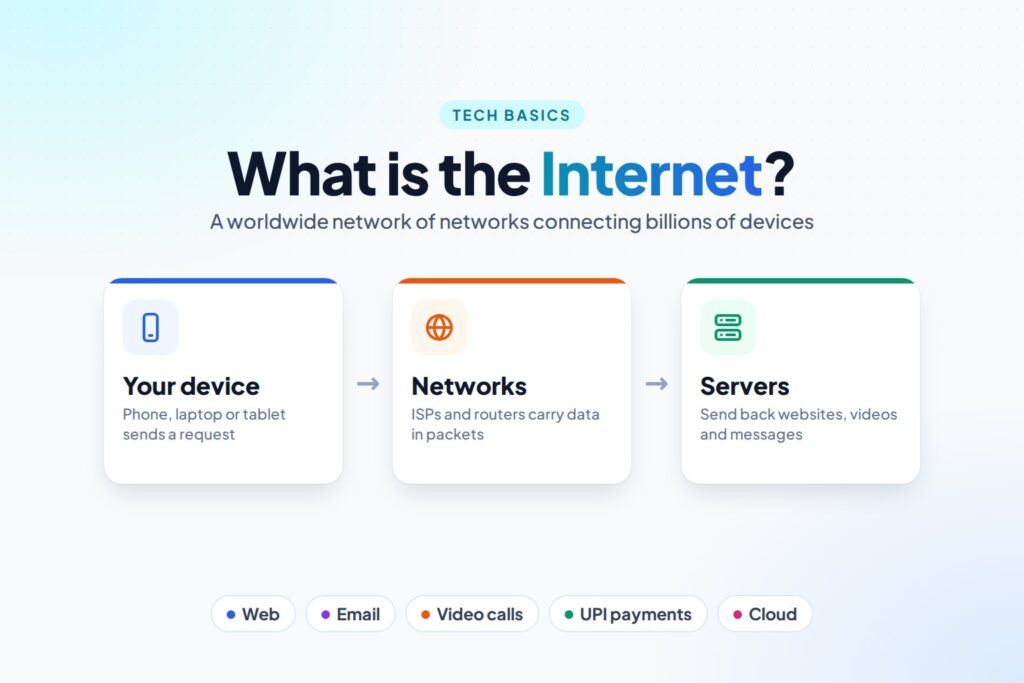
A network is a group of devices joined together so they can share information, like the computers in one office or the phones and laptops on your home Wi-Fi. The Internet connects millions of these networks into one giant network covering the whole planet. That’s where the name comes from: inter (between) + net (network).
According to the International Telecommunication Union (ITU), about 6 billion people, roughly three out of every four people on Earth, used the Internet in 2025.
How Does the Internet Work?
Let’s follow what happens when you open a website, such as tecadmin.net:
- You connect: your phone or laptop connects to the Internet through your Internet Service Provider (ISP), such as a broadband or mobile company.
- Find the address: computers find each other by numbers called IP addresses, not names. A system called DNS (Domain Name System) works like a phone book and looks up the IP address for
tecadmin.net. - Send a request: your browser sends a message to that address asking for the page.
- Break it into packets: data travels in small pieces called packets. Each packet carries the address it’s going to, like a labelled envelope.
- Travel through routers: routers pass each packet along, network to network, choosing a good path, a bit like postal sorting offices.
- The server answers: the website’s server, a computer that stores the website, sends the page back in packets.
- Put it back together: your device reassembles the packets in the right order, and the page appears on your screen.
All of this usually happens in well under a second!
Important Internet Words
| Word | Meaning |
|---|---|
| ISP | Internet Service Provider: the company that connects you to the Internet |
| IP address | A unique number that identifies a device on a network, like a home address |
| DNS | The “phone book” that turns names like google.com into IP addresses |
| Router | A device that directs data between networks |
| Server | A computer that stores websites, apps or files and sends them to others |
| Packet | A small piece of data sent across the Internet |
| Protocol | A set of rules computers follow to talk to each other, such as TCP/IP, HTTP and HTTPS |
| Bandwidth | How much data can travel per second: your Internet “speed”, measured in Mbps |
Internet vs World Wide Web
Many people use these words as if they mean the same thing, but they don’t:
| Internet | World Wide Web (WWW) | |
|---|---|---|
| What it is | The worldwide network itself: the cables, routers and connections | A collection of websites and web pages that you open in a browser |
| Think of it as | The roads | The shops along the roads |
| Started | 1969 (ARPANET) | 1989–1991 |
| Created by | Many researchers, including Vint Cerf and Bob Kahn (TCP/IP) | Tim Berners-Lee at CERN |
The Web is just one of the services that run on the Internet. Email, WhatsApp messages, online games and video calls also use the Internet, but they aren’t web pages.
How Do We Connect to the Internet?
| Type | How it works |
|---|---|
| Fibre broadband | Data travels as light through glass cables to your home. Very fast and reliable. |
| Mobile data (4G / 5G) | Your phone talks to nearby mobile towers by radio waves. |
| DSL and cable | Use telephone lines or TV cables. Older and usually slower than fibre. |
| Satellite | A dish talks to satellites in space. Useful in remote places with no cables. |
| Public Wi-Fi | Shared Internet in places like airports, cafés and railway stations. |
What Do We Use the Internet For?
- Communication: email, messaging apps and video calls.
- Information and learning: search engines, online courses, e-books and encyclopaedias.
- Entertainment: video streaming, music, online games and social media.
- Money: online banking, UPI payments and shopping.
- Services: booking tickets, ordering food, filing forms and paying bills.
- Work: cloud storage, online documents and working from home.
- Smart devices: smart TVs, speakers, cameras and home appliances, known as the Internet of Things (IoT).
Who Owns the Internet?
Nobody owns the whole Internet. Different parts are owned by different companies and governments: ISPs own their networks, companies own their servers, and groups of companies own the undersea cables. A few organisations look after shared rules and names, for example ICANN manages domain names and IP addresses, and the IETF and W3C write technical standards. Because everyone follows the same protocols, all these separate networks work together as one.
Internet, Intranet and Extranet
- Internet: the public, worldwide network that anyone can join.
- Intranet: a private network inside one organisation, such as a company or school, that only its members can use.
- Extranet: part of an intranet that’s shared with trusted outsiders, such as a company’s suppliers.
A Short History of the Internet
- 1969: ARPANET, a US research network, sent its first message between two universities. They tried to type “LOGIN”, but the system crashed after “LO”, so the first message ever sent was “LO”.
- 1970s: Vint Cerf and Bob Kahn designed TCP/IP, the rules that let different networks talk to each other.
- 1 January 1983: ARPANET switched to TCP/IP. This is often called the birthday of the Internet.
- 1989–1991: Tim Berners-Lee invented the World Wide Web at CERN, and the first website went online.
- 15 August 1995: public Internet access started in India through VSNL.
- 2000s–today: broadband, smartphones, social media, cloud services and 5G brought the Internet to billions of people.
Advantages and Disadvantages of the Internet
| Advantages | Disadvantages |
|---|---|
| Instant communication with anyone, anywhere | Scams, hacking and online fraud |
| Huge amounts of free information and learning | False information and fake news spread quickly |
| Banking, shopping and services from home, 24/7 | Privacy risks when personal data is collected |
| New jobs and ways of working | Too much screen time and online addiction |
| Entertainment and keeping in touch with family | Cyberbullying and harmful content |
How to Stay Safe Online
- Look for HTTPS and the padlock icon in the address bar before entering passwords or payment details.
- Never share OTPs or passwords with anyone, even someone who says they’re from your bank.
- Use strong, different passwords for each account, and turn on two-step verification.
- Think before you click. Be careful with links in messages and emails, especially ones that say “urgent” or offer prizes.
- Check facts with trusted sources before believing or sharing them.
- Be careful on public Wi-Fi. Avoid banking or shopping on open networks.
- Keep your apps and devices updated to fix security holes.
Practice Questions
Try these yourself, then click a question to see the answer.
1. What is the Internet?
A worldwide network of computer networks that lets devices share information.
2. What does ISP stand for?
Internet Service Provider.
3. Which system turns a website name into an IP address?
DNS (Domain Name System).
4. Who invented the World Wide Web?
Tim Berners-Lee, at CERN, between 1989 and 1991.
5. True or false: Wi-Fi and the Internet are the same thing.
False. Wi-Fi is a wireless link to a router; the router connects to the Internet.
6. What were the first two letters ever sent over ARPANET?
“LO”. The system crashed while typing “LOGIN”.
FAQ
What is the Internet in simple words?
The Internet is a worldwide network that connects computers, phones and other devices so they can send and receive information, such as messages, web pages, videos and payments.
Who invented the Internet?
No single person. It grew from ARPANET (1969). Vint Cerf and Bob Kahn, who designed TCP/IP, are often called the “fathers of the Internet”. Tim Berners-Lee invented the World Wide Web, which runs on the Internet.
What is the difference between the Internet and the Web?
The Internet is the global network of connected computers. The World Wide Web is a collection of websites you open in a browser, and it’s one of many services that use the Internet.
What is the full form of WWW?
World Wide Web.
Who owns the Internet?
No one owns all of it. Its parts are owned by many ISPs, companies and governments, and they all work together by following the same rules (protocols).
How many people use the Internet?
About 6 billion people in 2025, roughly 74% of the world’s population, according to the ITU.
Conclusion
The Internet is a worldwide network of networks that connects billions of devices. Data travels across it in small packets, guided by IP addresses, DNS and routers, from your device to servers and back, usually in under a second. The World Wide Web is just one service that runs on it, alongside email, messaging, video calls and online payments. It began with ARPANET in 1969 and now connects about three quarters of the world. Use it wisely: protect your passwords and OTPs, check before you click, and verify what you read.
How did it make you feel?
