

When you switch on a laptop or phone, you don’t have to tell the processor how to read the disk, draw each pixel on the screen or talk to the Wi-Fi chip. Something takes care of all that for you, and gives you a home screen to start from. That something is the operating system. In this guide you’ll learn what an operating system is, what it does, what happens when a computer starts, the different types of operating systems, and the ones you use every day.
What is an Operating System?
An operating system (OS) is the main software that manages a computer’s hardware and lets you and your apps use it. It’s the first program that starts when you switch on the device, and it keeps running until you switch it off.
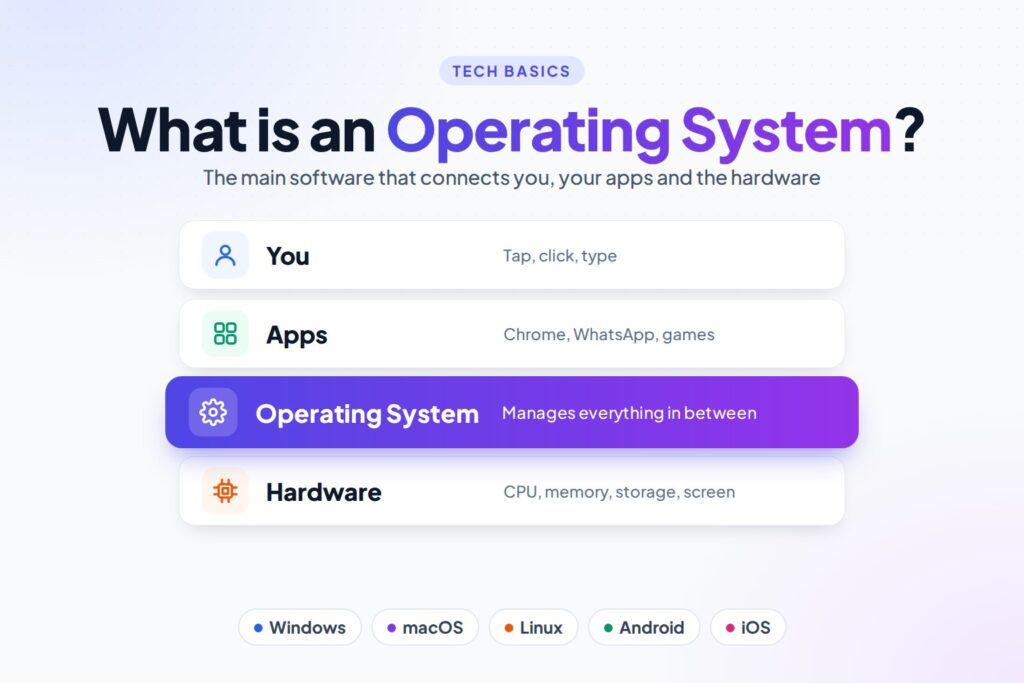
The OS sits between you and the hardware. You and your apps ask for things (“open this photo”, “play this song”, “save this file”), and the OS makes the hardware do the work.
Think of a restaurant. The customers (you and your apps) order food. The kitchen (the hardware) cooks it. The manager (the operating system) takes the orders, decides which cook does what, makes sure nobody’s order gets mixed up, and keeps the whole place running smoothly. Without the manager, it would be chaos.
Examples of Operating Systems
| Operating system | Made by | Used on |
|---|---|---|
| Windows | Microsoft | Most desktop and laptop PCs |
| macOS | Apple | Mac computers |
| Linux (for example Ubuntu, Fedora, Debian) | Open-source community and companies | Servers, supercomputers, desktops, and inside many devices |
| Android | Google (built on Linux) | Most smartphones and tablets, smart TVs |
| iOS and iPadOS | Apple | iPhone and iPad |
| ChromeOS | Chromebook laptops |
Android is the most widely used operating system in the world, because it runs on billions of phones. Windows leads on desktop and laptop computers, and Linux runs most of the servers behind websites and apps, and all of the world’s 500 fastest supercomputers.
What Does an Operating System Do?
The OS has many jobs, most of which happen quietly in the background:
| Job | What it means | Example |
|---|---|---|
| Process management | Decides which program uses the CPU and when, so many apps can run at once | Playing music while browsing the web |
| Memory management | Shares the RAM between apps and makes sure they don’t overwrite each other’s data | Closing a background app when memory runs low |
| File management | Organises data into files and folders on the storage drive | Saving, copying, renaming and deleting files |
| Device management | Controls hardware such as printers, cameras and keyboards using small programs called drivers | Printing a page, using a USB drive |
| Security | Protects data with user accounts, passwords and permissions | Screen lock, fingerprint login, app permissions |
| User interface | Gives you a way to talk to the computer: icons and windows, or typed commands | Desktop, Start menu, home screen |
| Networking | Connects the device to Wi-Fi, mobile data and the Internet | Joining a Wi-Fi network |
What Happens When You Switch On a Computer?
Starting a computer is called booting. Here’s what happens:
- Power on: the hardware wakes up and runs the firmware (BIOS or UEFI), a small program stored on a chip on the motherboard.
- Self-test: the firmware checks that the main hardware is working. This is the Power-On Self-Test (POST).
- Find the OS: the firmware starts a bootloader, which finds the operating system on the storage drive.
- Load the kernel: the core of the OS, called the kernel, is loaded into memory and takes control of the hardware.
- Start services: the OS starts background services such as networking, sound and drivers.
- Ready: you see the login screen or home screen, and the computer is ready to use.
Kernel and Shell: The Two Main Parts
- Kernel: the heart of the operating system. It talks directly to the hardware and manages the CPU, memory and devices. You never see it, but it’s always working.
- Shell: the outer layer you interact with. It takes your commands and passes them to the kernel. It can be graphical (the desktop and icons) or a command line (typed commands in a terminal).
The name fits: like a nut, the soft kernel is in the middle, protected by the shell around it.
GUI vs Command Line
| GUI (Graphical User Interface) | CLI (Command Line Interface) | |
|---|---|---|
| How you use it | Click or tap icons, menus and windows | Type text commands |
| Easy to learn? | Yes, very | Takes some practice |
| Best for | Everyday use | Servers, automation and fast, repeatable tasks |
| Examples | Windows desktop, Android home screen | Linux Terminal, Windows PowerShell |
For example, this Linux command lists the files in a folder, the same as opening it in a file manager:
ls
Want to try it? See our Linux command cheat sheets.
Types of Operating Systems
| Type | What it means | Examples |
|---|---|---|
| Desktop OS | For personal computers and laptops | Windows, macOS, Ubuntu |
| Mobile OS | For phones and tablets, designed for touch screens and long battery life | Android, iOS |
| Server OS | For computers that run websites and services for many users, often without a screen | Linux (Ubuntu Server, RHEL), Windows Server |
| Embedded OS | A small OS built into a device to do one job | Smart TVs, routers, cars, smart watches |
| Real-time OS (RTOS) | Must respond within an exact time, every time | Airbag controllers, medical machines, factory robots |
| Batch OS | Runs jobs one after another, with no user interaction (common on early computers) | Old mainframes; payroll and bill processing |
| Multi-user / time-sharing OS | Lets many users share one computer at the same time | Linux and Unix servers |
| Distributed OS | Makes many connected computers work together like one | Large clusters and some cloud systems |
Operating systems are also described as single-user or multi-user (how many people can use it at once) and single-tasking or multitasking (how many programs can run at once). Almost every modern OS is multitasking.
Open Source vs Proprietary Operating Systems
- Proprietary: owned by one company, and the source code is private. Examples: Windows, macOS, iOS.
- Open source: the source code is public, so anyone can study, change and share it. Example: Linux. Android is largely open source too, though most phones also include Google’s own apps and services.
A Short History of Operating Systems
- 1940s–1950s: early computers had no operating system. Operators set them up by hand for each job.
- 1950s–1960s: batch operating systems ran jobs one after another automatically.
- 1969–1970s: Unix was created at Bell Labs. Many of its ideas are still used in Linux and macOS today.
- 1981: MS-DOS, a command-line OS, came with the IBM PC.
- 1984–1985: Apple’s Macintosh and then Microsoft Windows made graphical interfaces popular.
- 1991: Linus Torvalds released the first version of the Linux kernel.
- 2007–2008: the iPhone (iOS) and the first Android phones started the smartphone era.
Practice Questions
Try these yourself, then click a question to see the answer.
1. What is the full form of OS?
Operating System.
2. Is Android an operating system or an app?
An operating system.
3. What is the core part of an OS that talks to the hardware called?
The kernel.
4. Name two jobs of an operating system.
For example: managing processes, memory, files, devices, security, the user interface or networking.
5. Which type of OS is used in a car’s airbag controller?
A real-time operating system (RTOS), because it must react within an exact time.
6. What does GUI stand for?
Graphical User Interface.
FAQ
What is an operating system in simple words?
An operating system is the main software on a computer or phone. It controls the hardware, runs your apps and gives you a screen to work with. Windows, macOS, Linux, Android and iOS are operating systems.
What are 5 examples of operating systems?
Windows, macOS, Linux (such as Ubuntu), Android and iOS.
Can a computer work without an operating system?
It can switch on and run its firmware, but you can’t use it normally: there’s no desktop, no apps and no way to open files. Some very simple devices run a single program without an OS, but every PC and phone needs one.
What is the most used operating system?
Android, because of the huge number of smartphones. On desktops and laptops, Windows is the most used.
Is Linux an operating system?
Strictly, Linux is the kernel. A complete operating system built on it, such as Ubuntu, Fedora or Debian, is called a Linux distribution. In everyday use, people call all of these “Linux”.
What is the difference between an operating system and application software?
The operating system runs the computer itself and manages the hardware. Application software, like a browser or a game, runs on top of the OS to help you do a particular task.
Conclusion
An operating system is the main software that manages a computer’s hardware and runs your apps. It handles processes, memory, files, devices, security, networking and the user interface, and it’s the first thing that loads when you switch on. Windows, macOS and Linux run computers, while Android and iOS run phones. Every app you use depends on the operating system quietly working underneath it.
How did it make you feel?
