Author: Rahul

I, Rahul Kumar am the founder and chief editor of TecAdmin.net. I am a Red Hat Certified Engineer (RHCE) and working as an IT professional since 2009..

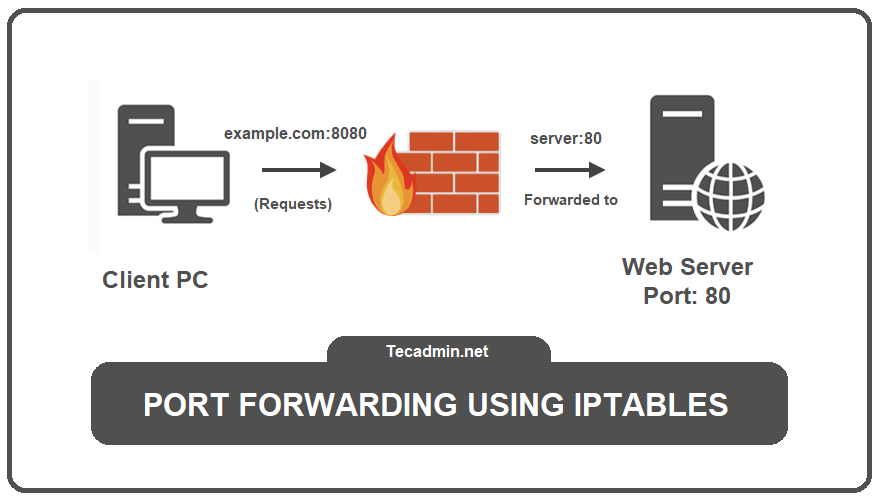
In real-life terms, Port forwarding is like telling the delivery driver where to go in a large apartment complex. Normally, the complex’s main door is locked to outsiders. But if someone from inside expects a delivery, they can tell the security guard to let the driver in and direct them to the specific apartment. Similarly, in computer networks, port forwarding lets someone from outside access a service inside a private network that they usually wouldn’t be able to reach. This is useful when you want to let people outside your network use a web server, play games on your game…

Read More

Welcome to Shell Scripting Challenge 002! In this challenge, we have created a simple Bash script with pre-increment, post-increment and a modulus operator. Please try to predict the output of the script. Shell scripting is not only to do practical tasks but also fun when you start working on it Below is the script for Challenge 002: #!/bin/bash x=12 ((x++)) ((++x)) ((x%3)) echo $((x++)) Take a moment to read the script and make your prediction. You can use the notepad to calculate the result. What will be printed to the console when this script is executed? Take into account the…

Read More

Hey, Linux fans! Guess what? The team working on Ubuntu 24.10 have given it a special name: “Oracular Oriole”. Sounds cool, right? Let’s talk about what this means and why it’s making waves in the tech world. Introducing “Oracular Oriole” Similar to the previous versions, Ubuntu 24.10 also given a codename, and this time it’s “Oracular Oriole”. The name itself is sounds like of a mystery, much like the vibrant oriole bird known for its elusive nature/ Here “Oracular” means wise and helpful, like a friend who gives good advice. “Oriole” is a type of bird known for being bright…

Read More

Are you dealing with low RAM on your Ubuntu system? This is a common issue on systems required more memory to running applications smoothly. This can be resolved by adding more memory, but that involves additional costs. If you don’t want to spend extra money, you can easily create a swap file and add it to your system to avoid low memory problems. If you are facing issue first time you can also try clearing the cached memory. What is Swap Space A swap file in Linux is the space allocated on disk utilized by system on low RAM. When…

Read More

As of writing this article, Node.js 20 is the latest LTS release, which is best suited for production servers. Alternatively, you can utilize the latest features with Node.js version 22. There are several ways to install Node.js on any system; however, we will focus on two methods. The first method uses NVM (Node Version Manager), which is the best and quickest way to install and manage multiple Node.js versions. The second method uses the official package repository to install Node.js on Ubuntu, allowing the installation of only one version at a time. This is ideal for production servers where applications…

Read More

Welcome to our guide on installing Google Chrome, one of the most popular web browsers available today. This article will walk you through the steps to seamlessly install Google Chrome on Ubuntu and Linux Mint systems. Whether you’re a developer or just need a reliable browser for everyday use, Google Chrome offers a range of powerful features to enhance your browsing experience. Let’s get started on setting up Google Chrome on your system. Most of the developers also like Firefox as there primary browser, so if are also one of them, These instructions will help you to install Mozilla Firefox…

Read More

While setting up an existing node application on a new Linux system, I faced the error “node-sass: Linux 64-bit with Unsupported runtime (108)”. This issue typically comes due to a mismatch between the node-sass version and the Node.js runtime versions. This error suggests that the node-sass is build with some other Node version and is incompatible with the current installed Node.js version. This tutorial will try to provide the solutions of possible causes of the issue Understanding the Error: This error comes when the node-sass package, which compiles Sass (.scss) to CSS, encounter the compatibility issue between your current Node.js…

Read More

PHP stands for Hypertext Preprocessor, which is remains a cornerstone of the web, powering a significant portion of websites and web applications across the internet. Majority of top websites and blogging tools are still running with PHP like WordPress, Facebook, Wikipedia etc. If you’re developing for the web on Ubuntu 24.04, installing PHP is likely one of the first tasks you’ll undertake. Do you want to build websites or run web applications on your Ubuntu 24.04 computer? If so, you’ll need to install PHP! This guide will show you how to easily install different versions of PHP (from 8.3 down…

Read More

🚀 Ubuntu 24.04 LTS is here! 🎉 Upgrading to Ubuntu 24.04 LTS (Long Term Support) is a straightforward process that promises enhanced performance, security, and new features. Whether you’re upgrading from an older LTS version or a more recent interim release, this step-by-step guide will help you navigate the upgrade process smoothly. Ubuntu 24.04 LTS, also known as Noble Numbat, brings with it an array of improvements and updates that make the upgrade worthwhile for both desktop and server users. Step 1: Backup Your Data Before proceeding with the upgrade, it’s crucial to back up your important data. This can…

Read More

XRDP is a popular open-source remote desktop protocol server that allows users to connect to a Linux system using RDP clients. However, you may encounter errors when starting an XRDP session. These errors can be frustrating and hinder your remote access capabilities. This guide will walk you through the common error messages you might see and provide detailed solutions to fix them. Error Details When attempting to start an XRDP session, you may encounter the following error messages in your logs: Mar 19 14:48:11 ubuntu22 xrdp-sesman[19218]: [INFO ] starting Xorg session… Mar 19 14:48:11 ubuntu22 xrdp-sesman[19218]: [INFO ] Starting session:…

Read More