

Python 3.14 is finally here as the latest stable release of the Python programming language! It brings tons of performance improvements, exciting new features, cleaner syntax, and better error messages — everything that makes coding in Python even more fun and productive. If you’re working on new projects or just want to stay up to date, having the latest version is always a good idea.
By default, Ubuntu 24.04 ships with Python 3.12, and older versions like 22.04 and 20.04 come with even earlier releases. That means the official Ubuntu repositories don’t have Python 3.14 yet. No worries though! Thanks to the amazing Deadsnakes PPA, we can easily install the brand-new Python 3.14 on any supported Ubuntu version in just a few minutes.
This tutorial is written for everyone — whether you’re a complete beginner who just installed Ubuntu yesterday or an experienced user who wants a quick guide. I’ll walk you through every single step with clear commands and explanations, so you can have Python 3.14 up and running without any confusion.
Deadsnakes PPA: What Is It?
For Ubuntu users, the Deadsnakes PPA is a dedicated repository that offers more recent Python versions than those found in the standard Ubuntu repositories. It is frequently used to install different programs and is maintained by reliable developers.
Step-by-Step Guide to Installing Python 3.14
Step 1: Update Your System
I always recommend keeping system packages up to date. These two commands will update all packages on your system.
sudo apt updatesudo apt upgrade
Step 2: Install the Required Dependencies
Next, you’ll need to install some software packages that help with adding new repositories and handling software installations. Run the following command:
sudo apt install software-properties-common
This ensures you have the necessary tools to manage PPAs (Personal Package Archives) on your system.
Step 3: Add the Deadsnakes PPA
Now, you can add the Deadsnakes PPA to your system. This is where Python 3.14 is available for installation. Enter this command:
sudo add-apt-repository ppa:deadsnakes/ppa
You may be prompted to press Enter to confirm adding the PPA. This will allow Ubuntu to pull Python versions from the Deadsnakes repository.
Step 4: Install Python 3.14
After adding the Deadsnakes PPA, you’ll need to update your package list again so that Ubuntu recognizes the new repository:
sudo apt update
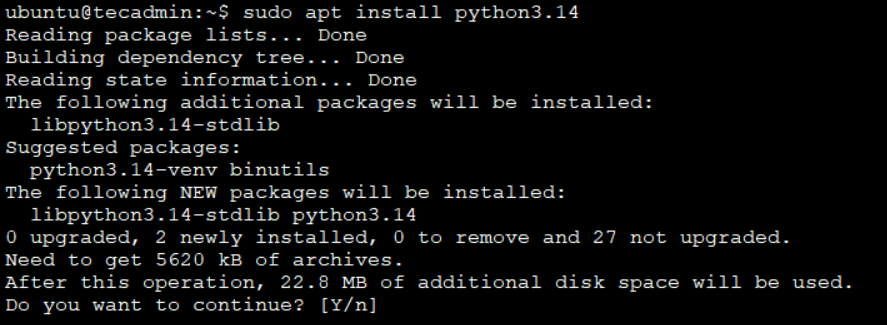
Now that the repository is added and updated, you can install Python 3.14. Type the following command:
sudo apt install python3.14
This command installs Python 3.14 on your system. It may take a few moments to complete, depending on your internet speed.
Step 5: Verify the Installation
Once Python 3.14 is installed, you can check the version to make sure everything went smoothly. Run this command:
python3.14 --version
If Python 3.14 was installed successfully, it will display the version number, like this:
Python 3.14.x
Step 6: Set Python 3.14 as the Default Version (Optional)
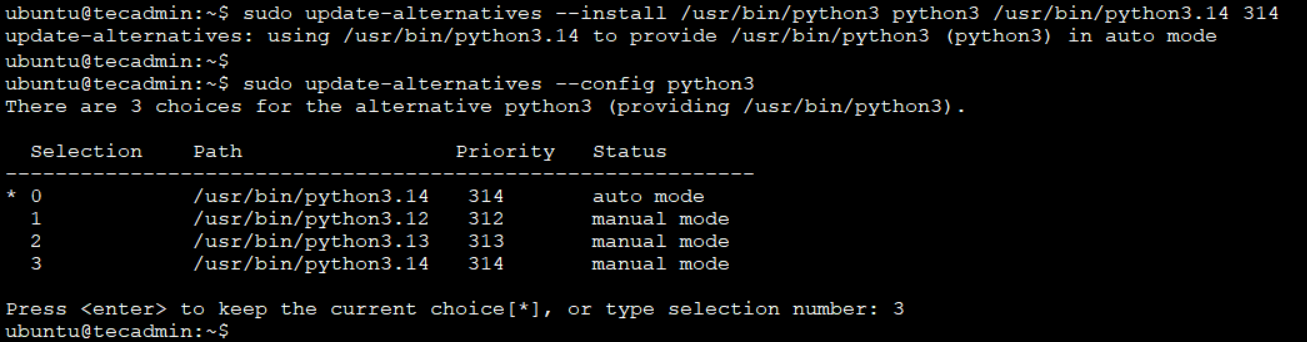
If you want Python 3.14 to be the default version when you type python3, you can set up update-alternatives to manage different versions of Python. Follow these steps:
- Add Python 3.14 to Alternatives:
sudo update-alternatives --install /usr/bin/python3 python3 /usr/bin/python3.14 314 - Select Python 3.14 as Default:
sudo update-alternatives --config python3You will see a list of installed Python versions. Choose the number corresponding to Python 3.14 and press Enter.
Now, when you type python3, your system will use Python 3.14 by default.
Step 7: Install Pip for Python 3.14
Pip is a package manager for Python that allows you to install additional Python libraries and tools. To install pip for Python 3.14, first install the distutils package:
sudo apt install python3.14-distutils
Then download and install pip using this command:
curl -sS https://bootstrap.pypa.io/get-pip.py | python3.14
This command downloads and installs pip for Python 3.14.
To verify pip is installed correctly, run:
pip3.14 --version
This should display the pip version associated with Python 3.14.
Conclusion
Congratulations! You’ve successfully installed Python 3.14 on your Ubuntu 24.04, 22.04, or 20.04 system using the trusted Deadsnakes PPA. You now have the latest and greatest Python ready to go — whether you’re building web apps, automating tasks, learning programming, diving into data science, or just experimenting with new ideas.
From now on, you can run python3.14 anytime to use the new version, and if you set it as default, even typing python3 will launch 3.14. With pip3.14 also installed, you’re fully equipped to install any package or library you need with a simple pip3.14 install package-name.
Enjoy the faster performance, cleaner syntax, and all the cool new features that come with Python 3.14. Happy coding, and welcome to the latest Python experience on Ubuntu!
How did it make you feel?