

Linux systems use both RAM and swap space to manage memory. RAM is the physical memory, while swap is a space on the hard drive used when RAM is full. By default, Linux can start using swap even if RAM is not full. You can change this by adjusting the swappiness value.
How to Set Swappiness to Use Swap Only When RAM is Full
If you want your system to use swap only when RAM is almost full, you should set the swappiness value to 1.
Steps to Change the Swappiness Value
- Open a terminal.
- To temporarily set swappiness to 1, type this command:
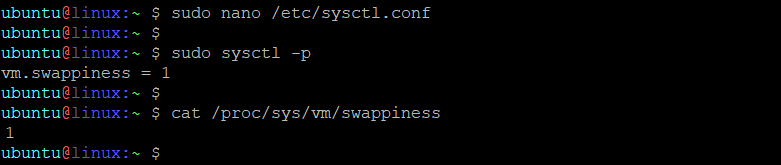
- To make this change permanent, follow these steps:
- Open the file
/etc/sysctl.confwith a text editor: - Add or modify this line in the file:
- Save the file and exit the editor.
- To apply the change, run this command:
sudo sysctl vm.swappiness=1
sudo nano /etc/sysctl.conf
vm.swappiness=1
sudo sysctl -p
Conclusion
By setting the swappiness value to 1, your Linux system will prioritize using RAM and only use swap space when the RAM is nearly full. This can help improve performance in most cases.
How did it make you feel?
