

Have you ever asked a phone, “What’s the weather today?” and heard it answer? Or noticed that YouTube shows you more of the videos you like? That’s Artificial Intelligence, or AI for short. In this guide, you’ll learn what AI is, how a computer can “learn”, where you already meet AI every day, and how to use it safely. Let’s go!
What is AI?
Artificial Intelligence (AI) means making computers smart, so they can do things that usually need a thinking brain, like understanding words, recognising pictures and answering questions.
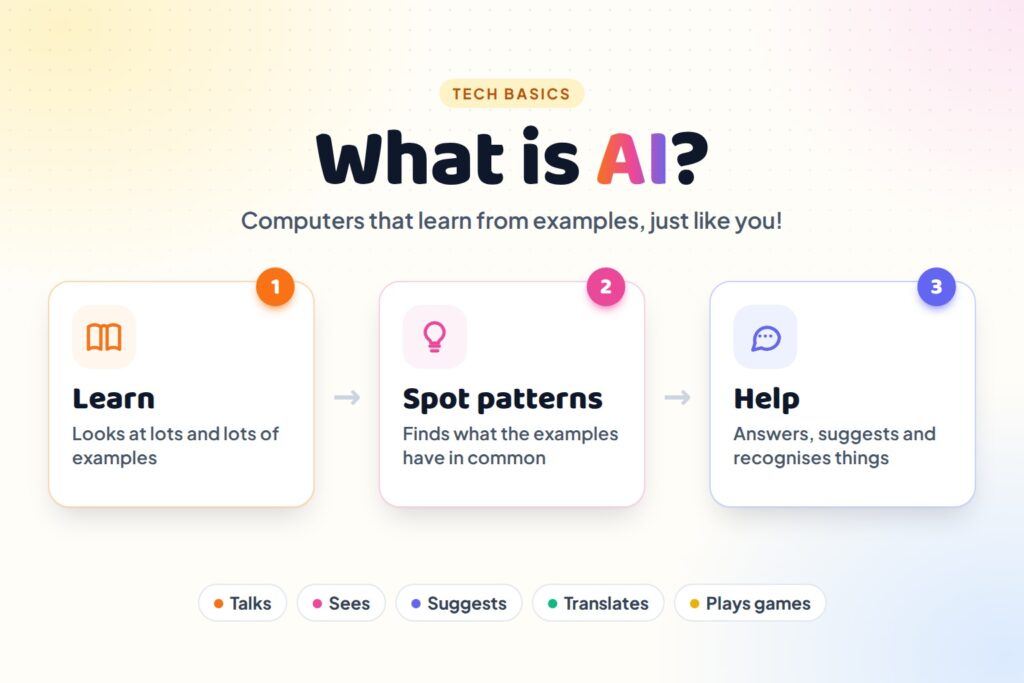
Let’s look at the two words:
- Artificial means made by people. A plastic flower is an artificial flower: people made it, it didn’t grow.
- Intelligence means being smart: being able to learn, think and solve problems.
So artificial intelligence is “smartness made by people”. It’s a computer program that can learn and make good guesses.
How Does AI Learn?
AI learns a bit like people do. Think about how a young child learns what a cat looks like.
They see lots of cats: big cats, small cats, black cats, white cats, sleepy cats and jumping cats. Each time, someone says “Look, a cat!” After a while, they can spot a cat they’ve never seen before. Nobody gave them a list of rules. They learned from examples.
AI learns in the same way:
- Look at examples: people show the computer thousands of pictures, each with a label like “cat” or “dog”.
- Find patterns: the computer notices what cat pictures have in common, like pointy ears, whiskers and a certain shape of face.
- Make a guess: when it sees a new picture, it uses those patterns to guess: “I think this is a cat!”
- Get better: if the guess is wrong, it’s corrected, and it learns from the mistake. The more examples it sees, the better it gets.
This kind of learning is called machine learning, because the machine (the computer) is learning.
Example: Teaching AI about fruit
| Step | What happens |
|---|---|
| Step 1 | We show the computer 1,000 photos of apples and 1,000 photos of bananas, each with its name. |
| Step 2 | It notices that apples are round and often red, and bananas are long, curved and yellow. |
| Step 3 | We show it a new photo of a long, yellow, curved fruit. |
The AI guesses: “Banana!” It has never seen this exact banana before, but it learned the pattern.
Where Do We See AI Every Day?
You probably use AI more often than you think!
| Where | What the AI does |
|---|---|
| Voice assistants (Google Assistant, Siri, Alexa) | Understands what you say and talks back |
| YouTube and streaming apps | Suggests videos it thinks you’ll like, based on what you watched before |
| Face unlock on a phone | Recognises the owner’s face |
| Maps | Finds the quickest road and guesses where traffic jams are |
| Translation apps | Changes words from one language to another, like Hindi to English |
| Chatbots (ChatGPT, Gemini, Claude) | Answers questions and writes stories, poems or explanations |
| Video games | Controls the characters you play against |
| Moves junk (spam) emails out of the way | |
| Hospitals | Helps doctors look at X-rays and scans |
| Self-driving cars | “Sees” the road, other cars and people, and helps steer |
What Can AI Do?
- See: recognise faces, animals, objects and handwriting in pictures.
- Listen: understand what you say out loud.
- Talk and write: answer questions, tell stories and explain things.
- Draw: make pictures from a few words, like “a cat riding a bicycle on the moon”.
- Play games: play chess and other games, sometimes better than world champions.
- Predict: make good guesses about what might happen next, like tomorrow’s weather.
What AI Can’t Do
AI is clever, but it’s not like a person:
- AI isn’t alive. It doesn’t eat, sleep, grow or have a family.
- AI doesn’t have feelings. If a chatbot says “I’m happy to help!”, it’s just being polite. It doesn’t really feel happy or sad.
- AI can make mistakes. Sometimes it gives a wrong answer and sounds very sure about it.
- AI only knows what it learned. If it never learned about something, it might make up an answer.
- AI needs people. People build it, teach it and decide how it’s used.
Is a Robot the Same as AI?
Not always! A robot is a machine with a body that can move, like a robot arm in a car factory or a robot vacuum cleaner. AI is the smart brain: a computer program.
| Has a body? | Uses AI? | |
|---|---|---|
| A chatbot on a tablet | No | Yes |
| A simple toy robot that only walks forward | Yes | No |
| A robot vacuum that learns the map of your house | Yes | Yes |
Some robots have AI inside them, and some don’t. And lots of AI lives only inside computers and phones, with no robot body at all.
How to Use AI Safely
- Use trusted apps. Stick to well-known AI apps and chatbots from official app stores or websites.
- Keep secrets secret. Never tell AI your passwords, OTPs, bank details, address or other private information.
- Double-check answers. AI can make mistakes, so check important facts.
- Use AI to learn, not to copy. It’s great for explaining things, but write your own work in your own words.
- Be kind. Don’t use AI to make fake pictures or mean messages about other people.
- Report problems. If AI shows you something harmful or upsetting, use the app’s report button.
A Short Story of AI
- 1950: a scientist named Alan Turing asked a big question: “Can machines think?”
- 1955–1956: a computer scientist named John McCarthy made up the name “artificial intelligence”, and scientists met in 1956 to start studying it.
- 1997: a computer called Deep Blue beat the world chess champion, Garry Kasparov.
- 2011–2014: voice assistants like Siri, Google Now and Alexa arrived on phones and speakers.
- 2022: ChatGPT came out, and millions of people started chatting with AI.
- Today: AI helps doctors, farmers, scientists, teachers and students all over the world.
Fun Facts About AI
- AI learns from huge amounts of examples: some chatbots learned from more text than a person could read in thousands of lifetimes.
- AI helps scientists study animals, for example by counting wild animals in thousands of photos taken by hidden cameras in forests.
- AI can’t taste, smell or touch anything. It only knows the world through data like words, pictures and sounds.
Activity: Be the AI!
Try this game with a friend or family member:
- Your friend secretly picks a rule, for example “animals that can fly”.
- They show you examples one by one and say “yes” or “no”: parrot (yes), cow (no), bee (yes), fish (no), eagle (yes).
- After each example, guess the rule.
- When you think you know, test it on a new animal. Is a butterfly a “yes”?
You just learned from examples, exactly like AI does!
Practice Questions
Try these yourself, then click a question to see the answer.
1. What does AI stand for?
Artificial Intelligence.
2. What does “artificial” mean?
Made by people, not by nature.
3. How does AI learn?
By looking at lots and lots of examples and finding patterns in them.
4. True or false: AI has feelings, just like us.
False. AI isn’t alive and doesn’t have feelings.
5. Name two places where you can see AI.
For example voice assistants, YouTube suggestions, face unlock, maps, translation apps or chatbots.
6. A chatbot asks for your home address. What should you do?
Don’t tell it! Never share your address or other private information with an AI chatbot.
FAQ
What is AI in simple words?
AI (Artificial Intelligence) is a computer program that can learn from examples and do clever things, like understanding speech, recognising pictures and answering questions.
What are some examples of AI?
Voice assistants like Google Assistant and Alexa, video suggestions on YouTube, face unlock on phones, maps that avoid traffic, translation apps and chatbots like ChatGPT.
Who invented AI?
No single person invented it. Alan Turing asked “Can machines think?” in 1950, and John McCarthy gave AI its name in 1955. Since then, thousands of scientists have helped build it.
Is AI dangerous?
AI is a tool, like a knife or a car: very useful, but it must be used carefully. It can make mistakes, and people can misuse it, so we should use it safely and check what it says.
Can AI think like a human?
No. AI is very good at finding patterns, but it doesn’t understand the world the way people do, and it has no feelings or imagination of its own.
Will AI take over the world?
No. AI is a computer program made and controlled by people. It’s here to help us, like a very clever calculator.
Conclusion
Artificial Intelligence means making computers smart. AI learns by looking at lots of examples and finding patterns, just like you learned to spot a cat. You meet AI every day in voice assistants, video suggestions, maps and chatbots. AI is very helpful, but it isn’t alive, it has no feelings and it can make mistakes. So use it carefully, keep your private information secret and always double-check what it tells you.
How did it make you feel?
